minemeld系列~3.minemeld miner创建与应用


应用

​ 通过上一篇文章已经能用docker进行容器化部署MineMeld服务了,本章中将安装应用youtube-miner和github-miner,以及自定义miner。

1)youtube-miner 地址: https://github.com/PaloAltoNetworks/youtube-miner

2)github-miner 地址:https://github.com/lampwins/github-miner

1. 安装miner

​ miner的安装方式分为2种,分别为源码安装、以及 wheel包安装

1)以下展示源码安装,即youtube-miner的安装方式,即Installation
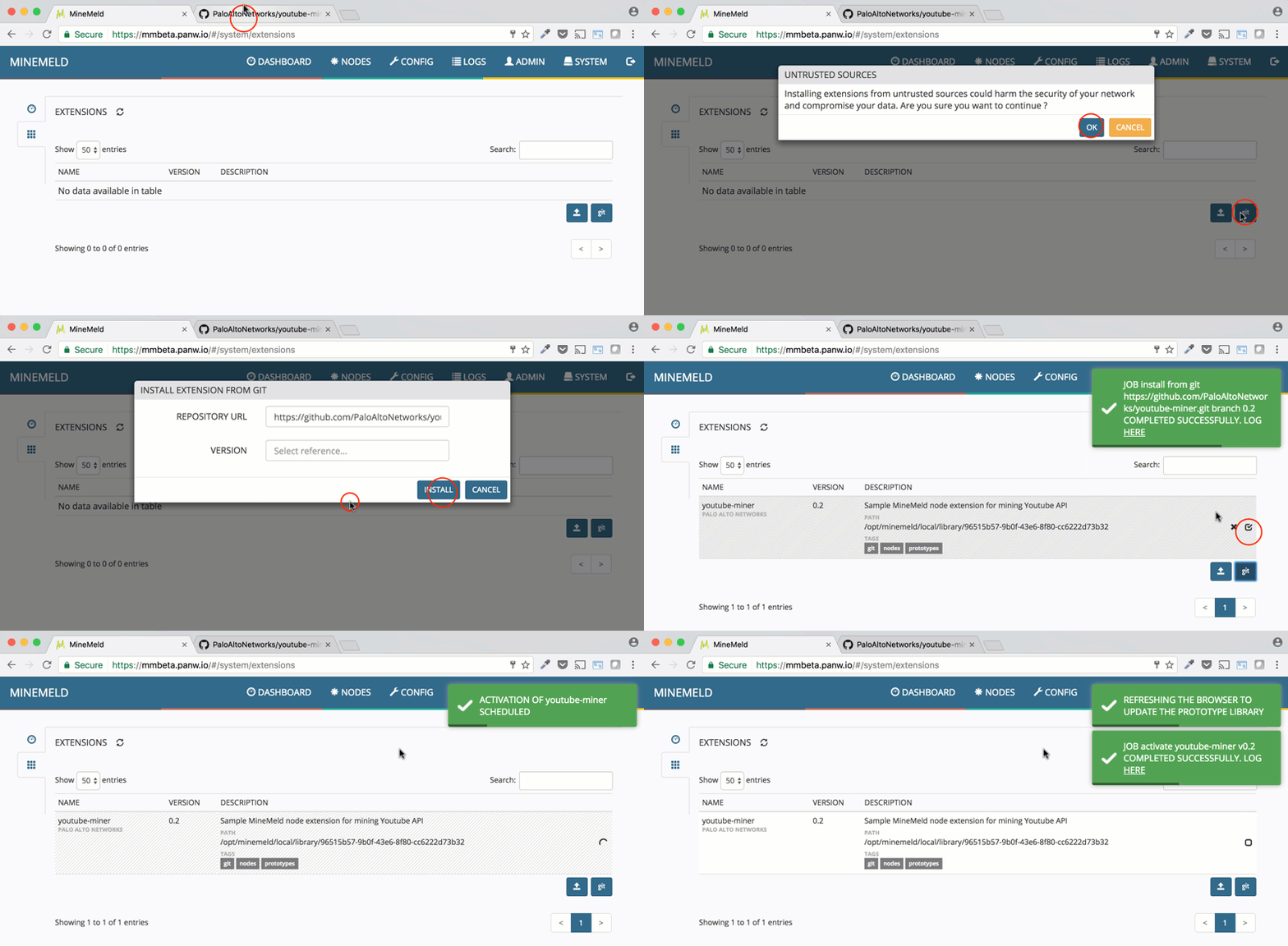
2)以下采用wheel包安装

先将源码pull拉取下来,然后通过打包命令,生成对应的wheel包

1
2
3
pip install wheel

python setup.py sdist bidet_wheel

然后再到MineMeld的 ‘SYSTEM’ –> ‘EXTENSIONS’ 界面中选择上传安装wheel文件。

以上安装方式都可行

2. 自定义MineMeld配置

2.1 默认Node配置

​ MineMeld的配置是committed-config.yml文件,在docker容器中的位置在/opt/minemeld/local/config/committed-config.yml。默认该文件配置了以下内容:

1
2
3
4
5
6
7
8
9
10
11
12
13
14
15
16
17
18
19
20
21
22
23
24
25
26
27
28
29
30
31
32
33
34
35
36
37
38
nodes:
spamhaus_EDROP:
output: true
prototype: spamhaus.EDROP
dshield_blocklist:
output: true
prototype: dshield.block
inboundaggregator:
inputs:
- spamhaus_DROP
- spamhaus_EDROP
- dshield_blocklist
- wlWhiteListIPv4
output: true
prototype: stdlib.aggregatorIPv4Inbound
inboundfeedhc:
inputs:
- inboundaggregator
output: false
prototype: stdlib.feedHCGreen
spamhaus_DROP:
output: true
prototype: spamhaus.DROP
wlWhiteListIPv4:
inputs: []
output: true
prototype: stdlib.listIPv4Generic
inboundfeedlc:
inputs:
- inboundaggregator
output: false
prototype: stdlib.feedLCGreen
inboundfeedmc:
inputs:
- inboundaggregator
output: false
prototype: stdlib.feedMCGreen

MineMeld默认了4个miner、1个processor、3个outputs,具体每一个Node节点的功能可参考 ‘minemeld系列~1.minemeld基础概念’中的讲解。

以上的默认配置构建了如下图中所示的mimer、processor、outputs:
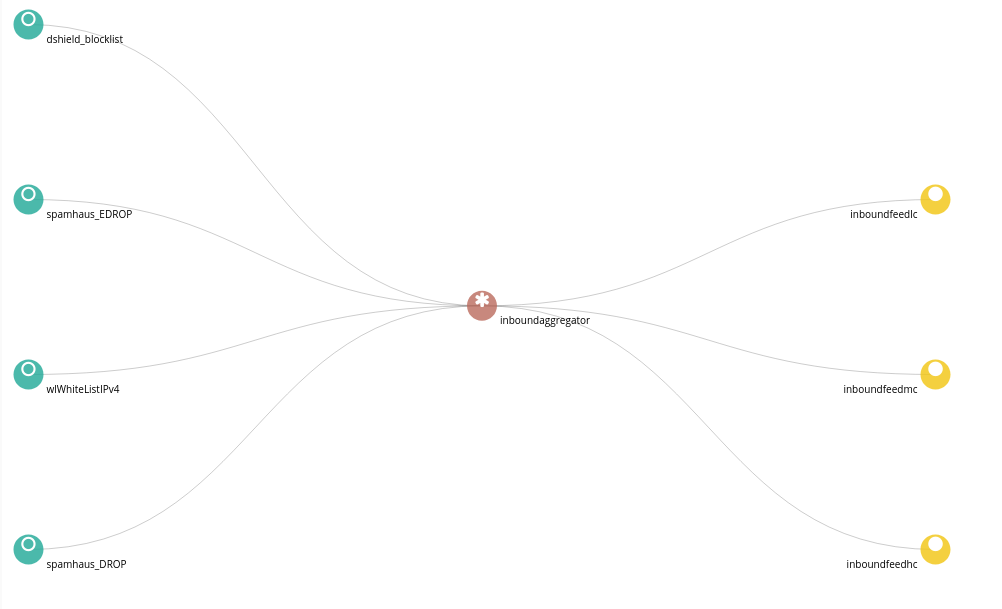
结构图

2.2 自定义处理流程

​ 自定义处理流程需要修改三个内容:

  • committed-config.yml:容器中位置/opt/minemeld/local/config/committed-config.yml
  • 新增prototype文件,如 deal_ip.yml文件:新增文件放于容器中位置/opt/minemeld/prototypes/0.9.70 或 /opt/minemeld/prototypes/current 中,具体位置有待测试
  • 新增miner、processor、outputs组件的处理逻辑:新增的可执行文件(如deal_ip.py文件)存放在/opt/minemeld/engine/0.9.70.post5/lib/python2.7/site-packages/minemeld/ft 路径下

2.3 案例

以下定义的配置,是直接在容器中修改,未测试结果

配置修改如下:

1)修改committed-config.yml中的内容,如下所示:

1
2
3
4
5
6
7
8
9
10
11
12
13
14
15
16
17
18
nodes:

douban_input:
inputs: []
output: true
prototype: douban_pro.DoubanInClass

douban_processor:
inputs:
- douban_input
node_type: processor
prototype: douban_pro.DouBanProcessorClass

douban_output:
inputs:
- douban_processor
outputs: false
prototype: douban_pro.DouBanOutClass

​ committed-config.yml中定义的输入douban_input、处理器douban_processor、输出douban_output。并定义在prototype文件中deal_ip.yml内的处理逻辑

2)新增deal_ip.yml中的内容如下:

​ deal_ip.py文件主要实现类方法DoubanInClass、DoubanProcessorClass、DoubanOutClass。即真正的逻辑处理这些类方法中实现

1
2
3
4
5
6
7
8
9
10
11
12
13
14
15
16
17
18
19
20
21
22
23
24
25
26
27
28
29
30
31
32
33
34
35
36
37
38
39
40
41
url: https://www.douban.com/
description: >
test minemeld douban-miner

prototypes:
DouBanIn:
author: whf
development_status: STABLE
node_type: miner
description: douban movie logs
config:
key: douban test
age_out:
default: 30
sudden_death: true
interval: 50000
class: minemeld.ft.deal_ip.DoubanInClass


DouBanProcessor:
author: whf
development_status: STABLE
node_type: processor
tags: []
description: >
douban logs processor
class: minemeld.ft.deal_ip.DoubanProcessorClass
config:
key: douban processor


DouBanOut:
author: whf
development_status: STABLE
node_type: output
description: >
douban logs putputs
class: minemeld.ft.deal_ip.DoubanOutClass
config:
key: douban outputs

3)新增deal_ip.py的内容,如下:

以下实现的类方法DoubanInClass、DoubanProcessorClass、DoubanOutClass 仅供参考。主要了解四个方法:

  • __init__
  • configure: 加载配置文件,从deal_ip.yml的config中获取配置参数
  • _process_item: 返回组装的数据
  • _build_iterator: 返回迭代列表对象
1
2
3
4
5
6
7
8
9
10
11
12
13
14
15
16
17
18
19
20
21
22
23
24
25
26
27
28
29
30
31
32
33
34
35
36
37
38
39
40
41
42
43
44
45
46
47
48
49
50
51
52
from . import basepoller


class DoubanInClass(basepoller.BasePollerFT):

def __init__(self, name, chassis, config):
super(DoubanInClass, self).__init__(name, chassis, config)

def configure(self):
super(DoubanInClass, self).configure()
self.key = self.config.get('key', None)
self.interval = self.config.get('interval', 80000)

def _process_item(self, item):
return [[item[0], item[1]]]

def _build_iterator(self, now):
yield 'input', 'test'


class DoubanProcessorClass(basepoller.BasePollerFT):

def __init__(self, name, chassis, config):
super(DoubanInClass, self).__init__(name, chassis, config)

def configure(self):
super(DoubanInClass, self).configure()
self.key = self.config.get('key', None)
self.interval = self.config.get('interval', 80000)

def _process_item(self, item):
return [[item[0], item[1]]]

def _build_iterator(self, now):
yield 'processor', 'test'


class DoubanOutClass(basepoller.BasePollerFT):

def __init__(self, name, chassis, config):
super(DoubanInClass, self).__init__(name, chassis, config)

def configure(self):
super(DoubanInClass, self).configure()
self.key = self.config.get('key', None)
self.interval = self.config.get('interval', 80000)

def _process_item(self, item):
return [[item[0], item[1]]]

def _build_iterator(self, now):
yield 'out', 'test'

文章作者: 王海飞
版权声明: 本博客所有文章除特別声明外,均采用 CC BY 4.0 许可协议。转载请注明来源 王海飞 !
  目录